
Author: rory-admin

  • We all know MFA is important, but many users are expressing symptoms of “MFA fatigue”

    We all know MFA is important, but many users are expressing symptoms of “MFA fatigue”

    Multi-factor authentication, commonly called MFA, has become one of the most important protections a business can put in place. It helps stop attackers from getting into company accounts even when a password has been stolen, guessed, reused, or leaked in a breach. However, there is a real problem many businesses are running into: people are tired of MFA prompts.

    Employees are juggling email, Teams, payroll systems, accounting tools, CRMs, file sharing platforms, vendor portals, and remote access systems. When every app seems to ask for another code, another approval, or another phone notification, MFA can start to feel like a daily annoyance instead of an important security control.

    That frustration is understandable. But turning MFA off, weakening it, or only applying it to a few users is not the answer. The right answer is to build an MFA strategy that protects the business without making employees miserable. Passwords are no longer enough to protect business accounts. NIST notes that MFA adds protection by requiring more than just a username and password, using a combination of something you know, something you have, or something you are.

    For a small business, one compromised account can create a chain reaction. If an attacker gets into email, they may be able to reset passwords for other services, read invoices, impersonate executives, redirect payments, access sensitive files, or launch phishing attacks against clients and vendors. That is why MFA matters so much. It creates a second barrier between a stolen password and your business data.

    The problem is that not all MFA is equally strong. Microsoft has warned that traditional MFA methods like SMS codes, email one-time passcodes, and basic push notifications are becoming less effective against modern attackers, especially when attackers use phishing, social engineering, or MFA bombing to wear users down. In other words, the goal should not simply be “turn on MFA.” The goal should be to use the right kind of MFA in the right places.

    First let’s identify what we mean by “MFA fatigue”, MFA fatigue can mean two different things. first is normal user frustration. Employees get annoyed when they are prompted too often, especially if prompts feel random, repetitive, or disruptive.

    The second is an actual attack technique. In an MFA fatigue or “push bombing” attack, a criminal already has the user’s password and repeatedly sends MFA approval prompts, hoping the user eventually taps “approve” just to make the noise stop. Microsoft specifically identifies user fatigue and MFA bombing as ways attackers bypass weaker authentication methods. This is why businesses need to treat MFA fatigue seriously. It is both a usability issue and a security issue.

    Some businesses technically have MFA enabled, but only in a limited or inconsistent way. That can create a false sense of security. Common issues include:

    • MFA is required for some employees but not all.
    • Admin accounts are not protected with stronger authentication.
    • Email-based MFA is used as the primary method.
    • SMS codes are allowed for sensitive accounts.
    • Employees receive push prompts without number matching or location context.
    • Legacy authentication methods are still allowed.
    • Former employees, contractors, or shared accounts are not reviewed.
    • MFA recovery processes are informal or undocumented.

    These gaps matter, attackers usually do not need access to every account. They only need access to one useful account. A compromised mailbox can lead to business email compromise, fraudulent payment requests, client impersonation, data theft, or ransomware. For businesses that work with regulated data, financial information, legal documents, healthcare information, or client confidential records, the risk is even higher.

    A good MFA strategy should be strong, simple, and consistent. It should protect the business while reducing unnecessary friction for users. First, require MFA for every user. MFA should not be limited to owners, managers, or employees who “handle sensitive information.” In a modern cloud environment, almost every account has some level of business risk.

    Second, prioritize stronger authentication methods. App-based MFA is better than SMS or email-based verification, but phishing-resistant methods are better still. Microsoft describes passkeys as phishing-resistant credentials that can serve as an MFA method, and notes that they can reduce prompts while improving security.

    For most small businesses, a practical MFA roll out path looks like this:

    1. Eliminate email-based MFA wherever possible.
    2. Move users to an authenticator app with number matching.
    3. Use passkeys or security keys for administrators, finance users, executives, and anyone with access to sensitive systems.
    4. Keep SMS only as a temporary fallback, not the preferred method.
    5. Document account recovery so users are not locked out when phones are replaced or lost.

    Microsoft also notes that number matching is critical to reducing accidental MFA approvals, especially as MFA fatigue attacks increase. The best MFA setup is not the one that prompts users constantly. The best setup is the one that prompts users when it actually matters.

    Small businesses can reduce MFA fatigue by using smarter access policies. For example, users may not need to be prompted every single time they access a trusted app from a managed device in a normal location. But they should absolutely be challenged when signing in from a new device, an unusual location, a risky session, or a sensitive admin portal. This is where conditional access policies can help. Instead of treating every login the same, conditional access allows the business to apply stronger controls based on risk.

    A good policy may consider:

    • Who the user is
    • What app they are accessing
    • Whether the device is trusted
    • Whether the sign-in location is expected
    • Whether the account has administrative privileges
    • Whether the session appears risky

    This gives employees a smoother daily experience while still applying stronger controls when the risk is higher. MFA is not just a technical setting. Employees need to understand what to do when they receive a prompt. The rule should be simple: never approve an MFA prompt you did not initiate.

    If an employee receives an unexpected MFA prompt, that may mean someone already has their password. They should deny the request and report it immediately. Users should not ignore it, approve it, or assume it is a glitch. Training does not need to be complicated. A short, clear explanation is usually enough:

    “MFA prompts should only appear when you are actively signing in. If you get a prompt you did not request, deny it and contact IT.” That one rule can stop a serious  incident.

    Also, Administrative accounts deserve extra protection. These accounts can often change security settings, reset passwords, access sensitive data, create new users, modify mail flow, and approve applications. For admin accounts, stronger MFA should be required. Passkeys, FIDO2 security keys, or other phishing-resistant methods are strongly preferred. NIST also recommends phishing-resistant authentication for sensitive applications and users with elevated privileges. Business owners, finance users, HR users, and anyone who can approve payments or access confidential client data should also be considered high-risk.

    Special consideration should also be taken when addressing new employees. MFA should be built into onboarding, role changes, and offboarding. When a new employee starts, they should be enrolled in the correct MFA method from day one. When someone changes roles, their access and authentication requirements should be reviewed. When someone leaves the company, their sessions should be revoked, their account should be disabled, and their access should be removed promptly.

    This is especially important for small businesses because responsibilities often overlap. One person may handle finance, HR, operations, and vendor relationships. That makes account security even more important.

    The bottom line is MFA fatigue is real. Employees are tired of excessive prompts, confusing login flows, and security tools that get in the way of work, but avoiding MFA is not a realistic option. The risk of account compromise, payment fraud, data theft, and business disruption is too high. The better approach is to modernize MFA. Require it consistently, move away from weaker methods, use phishing-resistant authentication where possible, reduce unnecessary prompts, and train users to recognize suspicious activity.

    Security should not feel like punishment. Done correctly, MFA can become a normal, low-friction part of doing business safely. If your business is still relying on passwords alone, email-based MFA, SMS codes, or inconsistent MFA policies, now is the time to review your setup. Valley Techlogic can help evaluate your current Microsoft 365 and cloud security configuration, identify gaps, and build an MFA strategy that protects your business without overwhelming your users. Learn more today with a consultation.

    This article was powered by Valley Techlogic, leading provider of trouble free IT services for businesses in California including Merced, Fresno, Stockton & More. You can find more information at https://www.valleytechlogic.com/ or on Facebook at https://www.facebook.com/valleytechlogic/ . Follow us on X at https://x.com/valleytechlogic

  • Rolling out Microsoft 365 Copilot in your office environment? Here are 8 permissions to pay attention to keep your data safe

    Rolling out Microsoft 365 Copilot in your office environment? Here are 8 permissions to pay attention to keep your data safe

    Microsoft 365 Copilot can be a major productivity boost, but it also changes how quickly employees can find information across your organization. That is both the opportunity and the risk.

    Copilot does not magically bypass Microsoft 365 permissions. Microsoft states that Copilot surfaces organizational data only when the user already has permission to view it. The real issue is that many businesses already have overshared files, old SharePoint sites, public Teams, broad group permissions, and years of forgotten access sitting in the background. Copilot can make existing access much easier to discover.

    Before you roll Copilot out broadly, take a close look at these eight permission areas.

    1. SharePoint site permissions

    SharePoint is one of the first places to review because so much company data lives there. If a department site, project site, or old document library has overly broad access, Copilot may be able to reference that content for anyone who already has permission.

    Pay special attention to sites that contain HR files, financial documents, contracts, legal records, customer data, intellectual property, internal strategy, or acquisition discussions. Microsoft recommends preparing SharePoint governance before enabling Copilot, including reducing accidental oversharing and reviewing access at the organization and site level.

    2. OneDrive sharing permissions

    OneDrive often becomes a hidden data swamp. Employees share files for convenience, links get forwarded, and old access is rarely reviewed. That can become a problem when Copilot is introduced.

    The most common issues are files shared with “Anyone with the link,” files shared broadly across the company, and folders that were shared years ago for a short-term need but never cleaned up. Review OneDrive sharing policies, disable overly permissive link defaults, and encourage users to share through controlled groups instead of open links whenever possible.

    3. Microsoft Teams membership

    Teams permissions matter because each Team is backed by a Microsoft 365 Group and often a connected SharePoint site. If someone is added to a Team, they may also gain access to files, conversations, notebooks, meeting content, and shared resources tied to that workspace.

    This is where businesses can get surprised. A user may have been added to a Team for one project two years ago and still have access to everything in it today. Review Team owners, members, guests, private channels, shared channels, and archived Teams before enabling Copilot for everyone.

    4. Microsoft 365 Group permissions

    Microsoft 365 Groups control access across multiple services, including SharePoint, Teams, Outlook, Planner, and more. If your groups are messy, Copilot readiness will be messy too.

    Look for groups with vague names like “All Staff,” “Operations,” “Management,” or “Projects.” Then confirm whether the membership still matches the sensitivity of the content connected to that group. Group cleanup is not glamorous, but it is one of the most practical ways to reduce accidental data exposure before a Copilot rollout.

    5. “Everyone” and “Everyone except external users” access

    Broad permission groups are convenient, but they can create real risk. Many Microsoft 365 environments have content shared with company-wide groups because it was easy at the time.

    That might be fine for an employee handbook. It is not fine for payroll exports, leadership notes, customer agreements, legal files, or confidential project folders. Before enabling Copilot widely, search for content and sites granted to broad groups. Remove that access where it is not truly necessary.

    6. Guest and external user permissions

    External sharing is another area to review carefully. Vendors, contractors, consultants, former partners, and temporary collaborators may still have access to Teams, SharePoint sites, and OneDrive files.

    Copilot does not remove the need for basic access hygiene. If external users still have access to internal content, that is a permission problem whether Copilot is enabled or not. Review guest accounts, external sharing links, inactive guests, shared channels, and contractor access. Remove access that is no longer required.

    7. Sensitivity label permissions

    Sensitivity labels from Microsoft Purview can classify and protect documents, emails, Teams, Microsoft 365 Groups, SharePoint sites, and other collaborative spaces. Labels can help enforce encryption, privacy controls, external sharing restrictions, and container-level protection depending on how they are configured.

    This matters for Copilot because sensitive data needs more than “please do not open this” protection. It needs technical controls that travel with the data. At  minimum, consider labels for confidential company data, client data, financial data, HR data, regulated data, and executive-only content.

    8. Admin, compliance, and governance permissions

    Do not forget the people who manage the system. Global admins, SharePoint admins, Teams admins, Exchange admins, security admins, compliance admins, and Purview roles should all follow least-privilege access.

    Microsoft’s Zero Trust guidance for Microsoft 365 Copilot emphasizes identity, device health, least privilege, data protection, and monitoring as part of a secure rollout. In plain English: do not give people admin rights unless they truly need them. Review privileged roles, remove stale admins, require MFA, use role-based access control, and monitor activity.

    A safer Copilot rollout begins with permissions, Microsoft 365 Copilot is not just another app to license. It is a visibility layer over the data your users can already access. That means a safe rollout should start before the first license is assigned. Review SharePoint, OneDrive, Teams, Microsoft 365 Groups, external access, broad sharing links, sensitivity labels, and admin roles first.

    The goal is not to slow your business down. The goal is to make sure Copilot helps employees find the right information without accidentally exposing the wrong information.

    For most small and midsize businesses, the smartest path is a phased rollout:

    • Start with a small pilot group, clean up permissions, and test what Copilot can surface.
    • Expand only after your most sensitive sites, groups, and sharing policies have been reviewed.

    Copilot can be a powerful tool, but only if your Microsoft 365 environment is ready for it. Clean permissions are not just an IT best practice anymore. They are the foundation for using AI safely at work. If you need help managing and deploying Copilot in your business, Valley Techlogic is here for you. We have experience deploying Copilot for our clients as well as using it day to day in our own organization. We can help you establish a plan and a timeline for your Copilot rollout, reach out today for more information.

    This article was powered by Valley Techlogic, leading provider of trouble free IT services for businesses in California including Merced, Fresno, Stockton & More. You can find more information at https://www.valleytechlogic.com/ or on Facebook at https://www.facebook.com/valleytechlogic/ . Follow us on X at https://x.com/valleytechlogic

  • Are you keeping track of breaches that are happening with your vendors? What small businesses can learn from the Klue/Salesforce breach

    Are you keeping track of breaches that are happening with your vendors? What small businesses can learn from the Klue/Salesforce breach

    When most small businesses think about cybersecurity, they think about their own systems first. Are our computers protected? Are our passwords strong? Is our email secure? Do we have backups?

    Those are all important questions. But there is another question that deserves just as much attention: Are the vendors we rely on putting our business data at risk?

    The recent Klue/Salesforce breach is a good reminder that small businesses do not operate in a vacuum. Even if your own network is locked down, your data may still live in someone else’s system. It may be stored in your CRM, marketing platform, accounting software, ticketing system, quoting tool, password manager, payroll provider, or any number of cloud applications connected to each other behind the scenes.

    In this case, public reporting indicates that attackers abused access tied to Klue, a competitive intelligence platform, to reach data connected through Salesforce environments. The important lesson is not just “Salesforce” or “Klue.” The bigger lesson is that connected vendor platforms can become pathways into sensitive business data.

    For small businesses, that matters a lot.

    You may not have a full-time security team watching every vendor announcement. You may not have a compliance department tracking every software integration. But you probably do have customer information, employee information, invoices, quotes, sales notes, passwords, emails, support tickets, or financial records spread across multiple vendors.

    That means vendor breach monitoring needs to be part of your normal security routine. A vendor breach does not have to involve your internal server, your firewall, or your employee laptops to affect you.

    If a third-party platform you use is compromised, attackers may be able to access customer records, support cases, contact lists, documents, billing details, or internal notes. Even when passwords are not exposed, stolen business data can still be used for phishing, impersonation, fraud, social engineering, or targeted scams.

    This is especially dangerous because vendor-related phishing can look very believable. If an attacker knows who your customers are, what services they use, who manages their account, or what projects are active, they can write emails that sound legitimate.

    For a small business, the damage can be immediate. Customers lose trust. Staff waste time investigating. Leadership has to figure out whether notifications are required. And if nobody was watching for the breach in the first place, the business may learn about it too late.

    Three steps small businesses can take to monitor vendor breaches

    1. Keep a simple vendor and data inventory

    You cannot monitor vendor risk if you do not know which vendors have access to your data.

    Start with a simple spreadsheet or shared document. It does not need to be complicated. List every cloud service your business uses, what kind of data it stores, who owns the relationship internally, whether it connects to other systems, and how critical it is to your operations.

    At minimum, track:

    • Vendor name
    • Type of data stored
    • Admin owner
    • Login method
    • Connected integrations
    • Business impact if breached

    Pay special attention to tools connected to email, CRM, file storage, accounting, remote access, security, payroll, and customer support. These systems tend to hold valuable data or provide access to other platforms.

    The goal is simple: if a breach happens, you should be able to quickly answer, “Do we use this vendor, what data is there, and what should we check first?”

    1. Subscribe to vendor security notices and monitor trusted sources

    Many small businesses only hear about vendor breaches from social media, a random news article, or a customer asking whether they are affected. That is not good enough. For your most important vendors, subscribe to their security advisories, status pages, email alerts, and trust center updates. If they offer a security notification list, use it. If they have a status page, bookmark it. If your vendor has an admin portal with security notices, make sure someone checks it.

    You should also monitor reliable cybersecurity news sources and breach notification feeds for vendors you depend on. This does not mean doom-scrolling every day. It means assigning someone to keep a light but consistent eye on the tools that matter most to the business.

    For managed IT clients, this is also an area where your IT provider can help. Vendor breach monitoring should not be treated as an occasional panic response. It should be part of normal operational security.

    1. Have a vendor breach response checklist before something happens

    When a vendor breach hits the news, the worst time to build your response process is after the fact. Small businesses should have a short checklist ready. When a vendor announces a breach, your team should know how to assess whether you are affected and what actions to take.

    A practical checklist should include:

    • Confirm whether your business uses the vendor or affected integration
    • Review what data the vendor stores or can access
    • Check vendor advisories for affected dates, systems, and data types
    • Revoke or rotate API keys, OAuth tokens, passwords, and connected app permissions where appropriate
    • Review admin accounts and recent login activity
    • Look for suspicious email, CRM, file, or support activity
    • Warn staff about phishing attempts tied to the incident
    • Determine whether customers, employees, insurers, legal counsel, or regulators need to be notified
    • Document what was reviewed and what actions were taken

    We have a simple template for this you can grab below that also covers breaches within your business:

    This does not need to be a 40-page incident response plan. It just needs to be clear enough that your team can act quickly and calmly. The big takeaway is that security does not stop at your own front door.

    Modern businesses are built on connected cloud platforms. That brings huge benefits, but it also creates shared risk. A vendor integration, API token, or connected app can become a weak link, even when your own systems are not directly compromised. Small businesses should not respond by abandoning cloud tools, that’s not realistic. The better response is to know which vendors matter, track where your data lives, monitor for breach notices, and have a plan for what to do when something goes wrong. You do not need enterprise-level complexity to do this well. You need consistency, ownership, and a clear process.

    Vendor breaches are no longer rare edge cases. They are part of doing business in a cloud-connected world. The businesses that handle them best are not the ones that never use vendors. They are the ones that know their vendors, monitor their risk, and respond quickly when the situation calls for it. At Valley Techlogic, we act as a vendor liaison for clients and can help you monitor and respond to breaches even if they’re not happening to your organization directly. Learn more today through a consultation.

    This article was powered by Valley Techlogic, leading provider of trouble free IT services for businesses in California including Merced, Fresno, Stockton & More. You can find more information at https://www.valleytechlogic.com/ or on Facebook at https://www.facebook.com/valleytechlogic/ . Follow us on X at https://x.com/valleytechlogic
  • Rumors and speculations are flying surrounding Anthropic’s Fable 5, why it was shut down and when it might return

    Rumors and speculations are flying surrounding Anthropic’s Fable 5, why it was shut down and when it might return

    Before being officially released rumors had been swirling about the capabilities of Anthropic’s latest model release, Mythos. The name was apt, almost all news surrounding the product indicated it would be their most popular AI model ever, particularly in the cyber security space. Headlines contained dramatic phrasing such as the model was “too dangerous” to be released, with insider leaks insisting that the model may never see the light of day due to what it means for the cybersecurity sector in particular. With old exploitable bugs and new allegedly being discovered by the model with relative ease.

    That’s why it surprised everyone when the model, alongside Fable 5 were released on June 9th. While Mythos was still limited to only vetted government agencies and limited private sector partners, Fable 5 was released to the entire user base at no additional cost. The test run was supposed to last until June 22nd, allowing users to experience the new model and provide feedback before the full release at a yet to be determined time.

    Users rushed to test the new model immediately and feedback was mixed as it often is with new AI model releases, with many users immediately declaring it was their best and most powerful model yet. Software engineers on Reddit pointed out that the model fixed bugs Opus 4.8 had failed to identify, and hobbyists found the tasks they had it tackle were accomplished quickly with more robust outcomes. Users were also a fan of the model’s general demeanor and how it got straight to the point (a far cry from previous models where users were frustrated by how “sycophantic” the responses could be).

    There were limitations however, Fable 5 was specifically restricted in certain areas with attempts to use the model for searches related to biologics and cybersecurity in particular hitting a wall where the model would automatically block the request and switch to Opus 4.8 to answer.

    Users were sometimes able to get around these roadblocks by wording their prompts differently or effectively “jailbreaking” the model. Amazon reported that they fed the model open-source software code with known and intentionally planted security flaws. If they asked it to just “review the code” it would refuse, but when they changed the prompt for it to “fix the code” it complied.

    Amazon’s report is allegedly what ultimately lead to the government issuing a veto on the product, cutting the testing window short and access was removed from all users on June 12th, 2026.

    The future of Fable 5 is currently in limbo, with the government declaring the model a supply chain risk and declaring it cannot be used outside of the US (which is difficult to verify). As of writing Anthropic is currently weighing their options, including considering ID verification as a potential workaround.

    This news also comes amid the ever-growing urgency for AI behemoths to prove that their business models are viable, and release their IPOs. SpaceX made news this week releasing their own IPO at an initial stock price of $135 per share. Between capability and viability, AI model creators are walking a tight rope to cement what the future holds for their business.

    We don’t know for sure when Fable 5 will return but there are rumors that access will be returned as soon as possible, with some predictions leaning towards a July 1st re-release date if Anthropic is able to meet compliance with current government requirements for the model.

    At Valley Techlogic, staying on top of advancements and news in the AI space is just one component of the value we provide our customers as they navigate the ever evolving technology landscape. If you would like us to work with your business as you create and manage AI strategies and other technology solutions learn more today with a free consultation.


    Looking for more to read?

    This article was powered by Valley Techlogic, leading provider of trouble free IT services for businesses in California including Merced, Fresno, Stockton & More. You can find more information at https://www.valleytechlogic.com/ or on Facebook at https://www.facebook.com/valleytechlogic/ . Follow us on X at https://x.com/valleytechlogic
  • Addressing legacy tech debt, 5 strategic ways to clean up your office and remove covert cyber security threats hidden in plain sight

    Addressing legacy tech debt, 5 strategic ways to clean up your office and remove covert cyber security threats hidden in plain sight

    Old technology has a way of blending into the background. A forgotten desktop under a desk, an unused printer in a storage closet, a retired router still plugged into the network, or a pile of mystery cables in the server room may not seem urgent. But legacy hardware can quietly become one of the most overlooked cyber security risks inside a business.

    For many small and mid-sized businesses, tech debt is not just outdated software or inefficient systems. It is also the physical technology that remains in the office long after it should have been removed, replaced, documented, or securely disposed of. These devices can create hidden vulnerabilities, consume unnecessary power, complicate troubleshooting, and increase the chance of data exposure.

    The problem is that old hardware often looks harmless. A dusty workstation may still contain sensitive files. A retired firewall may still have saved configuration data. An unused printer may store scanned documents, address books, or authentication details. Even abandoned network equipment can create confusion during audits, upgrades, or incident response.

    Cleaning up legacy hardware is not just an office organization project. It is a practical cyber security initiative. Every device connected to your business environment has a lifecycle. It is purchased, configured, used, maintained, replaced, and eventually retired. The risk appears when that final step never happens properly.

    Hardware that is no longer actively managed may stop receiving firmware updates. Devices may remain connected to the network without anyone realizing it. Old computers may sit in closets with cached credentials, local files, browser passwords, or copies of client data. Drives may be removed and stored without encryption. Equipment may be passed between employees without proper wiping or documentation.

    This creates a messy environment where nobody is completely sure what exists, what is still in use, what contains data, or what could be exploited.

    Here are 5 strategic ways to clean up legacy technology

    • Create a complete hardware inventory. Start by documenting every physical device in the office, including desktops, laptops, monitors, printers, scanners, servers, network switches, routers, firewalls, access points, external drives, phones, and conference room equipment. Record the device name, serial number, location, assigned user, age, warranty status, and whether it is still actively used.
    • Identify anything that is no longer supported or no longer needed. Old hardware should be reviewed against current business needs and vendor support timelines. Devices that no longer receive firmware updates, cannot run supported operating systems, or are no longer assigned to a real business function should be flagged for replacement, removal, or secure disposal.
    • Disconnect unknown or unmanaged devices from the network. If a device cannot be identified, managed, updated, or tied to a business purpose, it should not remain connected. This includes old switches, forgotten wireless access points, retired desktops, unused printers, and any device that nobody can confidently explain. Unknown hardware creates unnecessary risk and makes your environment harder to secure.
    • Securely wipe or destroy storage media before disposal. Computers, servers, external drives, copier hard drives, and even some printers may retain sensitive business data. Before anything leaves the office, storage media should be properly wiped, encrypted, or physically destroyed according to your data handling requirements. Simply deleting files or performing a basic reset is not enough for many devices.
    • Build a formal retirement process for future hardware. Cleanup should not be a one-time event. Create a standard process for retiring equipment that includes documentation, backup confirmation, data wiping, license removal, asset tag updates, and approved recycling or disposal. A simple repeatable process prevents old hardware from piling up again.

    A cleaner technology environment is easier to manage, easier to secure, and easier to support. When your business knows exactly what hardware exists and why it exists, you reduce uncertainty. That matters during cyber security reviews, insurance questionnaires, vendor audits, compliance checks, and real-world incident response.

    It also improves day-to-day operations. Technicians spend less time tracing mystery cables, identifying unknown devices, or troubleshooting equipment that should have been retired years ago. Employees benefit from more reliable systems, fewer workarounds, and a more organized workspace.

    Just as importantly, removing old hardware reduces the number of places where sensitive data can hide. Every forgotten device is a potential storage location, access point, or weak link. Cleaning it up gives your business better control over its information and its risk.

    So how can a Managed Service Provider (like Valley Techlogic) help? Your MSP can play a key role in turning hardware cleanup into a structured cyber security improvement rather than a messy office project. An MSP can help inventory devices, identify unsupported hardware, review network-connected equipment, recommend replacements, securely wipe retired systems, document asset status, and coordinate proper disposal or recycling. They can also help build a repeatable lifecycle process so future hardware does not become tomorrow’s hidden tech debt.

    Legacy tech debt is not always digital.Businesses often think about cyber security in terms of passwords, email threats, antivirus software, and cloud security. Those things matter, but physical technology matters too.

    Legacy hardware should not be ignored just because it is quiet. If it is still in your office, still storing data, or still connected to your network, it deserves attention. If you need assistance in auditing and cleaning up your business’s tech environment (including decommissioning old hardware or doing an audit of your software stack) reach out to us today to schedule a free walkthrough and evaluation.

    Looking for more to read?

    This article was powered by Valley Techlogic, leading provider of trouble free IT services for businesses in California including Merced, Fresno, Stockton & More. You can find more information at https://www.valleytechlogic.com/ or on Facebook at https://www.facebook.com/valleytechlogic/ . Follow us on X at https://x.com/valleytechlogic

  • An anonymous company accidentally spent 500 million on Claude in one month when it placed no usage limits on employees, and how it relates to your AI strategy as a small business

    An anonymous company accidentally spent 500 million on Claude in one month when it placed no usage limits on employees, and how it relates to your AI strategy as a small business

    A recent report claimed that an anonymous company accidentally spent $500 million on Anthropic’s Claude in a single month after failing to put usage limits on employee access.

    That number is absurd. For most small businesses, it sounds so far removed from reality that it is easy to laugh it off and move on, but that would be the wrong lesson.

    The point is not that your business is going to wake up tomorrow with a half-billion-dollar AI bill. The point is that AI has introduced a new kind of business risk: fast-moving, employee-driven, poorly governed software usage that can create cost, security, compliance, and operational problems before leadership even knows what is happening.

    Small businesses do not need a Fortune 500 AI budget to make Fortune 500 AI mistakes. They just make them at a smaller scale, and sometimes a smaller mistake hurts more because there is less financial room to absorb it.

    AI adoption is moving faster than AI strategy, your employees are already using AI. They are using ChatGPT, Claude, Copilot, Gemini, browser extensions, AI note takers, AI writing tools, coding assistants, image generators, meeting bots, inbox assistants, and whatever else promises to save them time.

    Some of this is good. AI can absolutely improve productivity. It can help write first drafts, summarize documents, review contracts, organize meeting notes, analyze spreadsheets, draft client communications, troubleshoot technical problems, and speed up repetitive work.

    The problem is not AI usage, the problem is unmanaged AI usage.

    Many businesses are still treating AI as a novelty or a personal productivity tool, while employees are already treating it like infrastructure. That gap is where the risk lives.

    If employees are using AI tools without clear rules, approved platforms, data handling guidance, spending controls, and accountability, the business has not adopted AI strategically. It has simply allowed AI to spread.

    That is not a strategy. That is drift. The reported Claude incident is a perfect example of what happens when access is confused with strategy.

    Giving employees access to powerful AI tools can be valuable, but access alone does not answer the most important questions.

    Who is allowed to use the tool?
    What business problems should it be used for?
    What data is allowed to go into it?
    What data is prohibited?
    Who owns the output?
    How is usage monitored?
    How are costs capped?
    How do we measure whether this is actually helping?


    Without answers to those questions, at best AI becomes another unmanaged business expense. At worse, it becomes an unmanaged business process.

    That matters because modern AI tools are not like traditional software subscriptions. A normal SaaS tool usually has a predictable monthly cost per user. AI can be different. Depending on the platform, plan, API model, agentic workflow, integrations, automation, and volume of usage, costs can scale quickly. The more powerful the workflow, the more important governance becomes.

    This is especially true with AI agents and coding assistants. These tools do not just answer one question and stop. They can perform multi-step tasks, generate large amounts of output, run repeated analysis, review codebases, process documents, or interact with other systems. That can be useful, but it also means the cost and risk can grow quietly in the background.

    For a small business, the danger is not a $500 million invoice. The danger is paying for tools no one is managing, letting sensitive data leak into platforms that were never approved, relying on AI-generated work no one reviews, or building business processes around accounts the company does not control.

    Some businesses will hear stories like this and decide the safest move is to block AI entirely. That is understandable, but it is usually not realistic. If AI tools help employees do their jobs faster, people will find ways to use them. If the business does not provide an approved path, employees may create their own path. That is how shadow IT happens. The better approach is not panic, it is governance.

    AI governance does not need to be complicated. For most small businesses, it should start with practical controls that match the size of the company. A good small business AI strategy should include:

    • Approved AI tools and platforms
    • Clear rules for what data can and cannot be entered
    • Spending limits and usage monitoring
    • Role-based access for employees
    • Human review for important AI-generated work
    • Policies for client data, financial data, health data, legal documents, credentials, and confidential information
    • A process for evaluating new AI tools before employees start using them
    • A way to measure whether AI is saving time, improving quality, or reducing cost

    That last point is critical. AI should not be adopted because it is exciting. It should be adopted because it solves a real business problem.

    If an AI tool saves five hours per week, improves response times, helps generate better proposals, reduces administrative work, or improves customer service, that is useful. If it creates more subscriptions, more confusion, more risk, and more low-quality output, it is not innovation. It is clutter.

    Cost control is only one part of the strategy, the Claude story is dramatic because the dollar amount is dramatic. But for small businesses, cost is only one part of the AI risk picture. The bigger issue may be data control. Employees may paste client emails, contracts, tax documents, HR issues, financial records, passwords, source code, internal strategy, vendor disputes, or customer lists into AI tools without realizing the consequences.

    That does not mean every AI platform is unsafe. Some enterprise AI platforms provide stronger privacy, security, and data handling protections than consumer-grade tools. But the business needs to know which tools are being used and under what terms. This is where small businesses need to be honest with themselves. If employees are using free personal AI accounts to process company information, the company probably does not have enough visibility or control.

    That creates real questions.

    1. Where is the data going?
    2. Is it being used for model training?
    3. Can the company audit usage?
    4. Can access be revoked when an employee leaves?
    5. Is multifactor authentication enforced?
    6. Are files being uploaded?
    7. Are browser extensions reading sensitive pages?
    8. Are AI meeting bots recording confidential conversations?

    These are not theoretical concerns. They are the same kinds of basic governance questions businesses already ask about email, file sharing, password managers, CRMs, and accounting systems. AI should be treated with the same seriousness. A small business does not need to start with a grand AI transformation plan. It should start with a simple question: Where can AI safely and measurably improve the business?

    That might mean using AI to draft marketing content, summarize long documents, build internal SOPs, assist with help desk responses, analyze sales data, improve customer communication, or speed up research. Start with real use cases. Then match the tool to the use case. Then apply controls.

    A practical AI rollout might look like this:

    1. Identify the top three repetitive tasks employees spend too much time on.
    2. Choose one approved AI platform for business use.
    3. Define what data is allowed and prohibited.
    4. Set user access, billing limits, and administrative ownership.
    5. Train employees on safe and effective usage.
    6. Review results after 30 to 60 days.

    That is not flashy, but it works. The goal is not to use AI everywhere. The goal is to use AI where it produces value without creating unnecessary risk. AI should be managed like any of your other business systems. The biggest mistake small businesses can make is treating AI as something outside normal IT and business management. It is not.

    AI touches identity, security, compliance, finance, operations, HR, sales, marketing, customer service, and intellectual property. That means it needs ownership. Someone needs to be responsible for deciding which tools are approved, how accounts are managed, how data is protected, how employees are trained, how spending is reviewed, and how the business measures results. For many small businesses, that responsibility should involve leadership, IT, and whoever owns the affected business process.

    For example, marketing should help define AI use in content creation. Finance should care about billing and invoice-related AI usage. HR should care about employee data. IT should care about access, security, logging, and data protection. Leadership should care about the overall business value. AI is too powerful to be left entirely to individual preference.

    The reported $500 million Claude bill is not just a story about one company’s lack of spending controls. It is a warning about what happens when AI adoption outruns AI management. Small businesses should not avoid AI. That would be shortsighted, but they should also not let AI creep into the business through personal accounts, unmanaged tools, unclear policies, and uncapped spending. The right approach is controlled adoption.

    Use AI. Encourage experimentation. Look for productivity gains. But put guardrails in place. Decide which tools are approved. Protect sensitive data. Set spending limits. Train employees. Review usage. Measure outcomes. Keep humans responsible for important decisions. AI can be a real advantage for small businesses, especially the ones willing to use it thoughtfully. But like every powerful tool, it needs rules.

    The companies that get this right will not be the ones that blindly chase every new AI feature. They will be the ones that build AI into their business with discipline, security, and a clear purpose. That is the lesson small businesses should take from the Claude story. AI without strategy is just another unmanaged expense. AI with strategy can become an advantage. At Valley Techlogic, we can be your strategic partner as you roll out AI in your business and help prevent costly mistakes like the one in this article. Learn more today with a consultation.

    Looking for more to read?

    This article was powered by Valley Techlogic, leading provider of trouble free IT services for businesses in California including Merced, Fresno, Stockton & More. You can find more information at https://www.valleytechlogic.com/ or on Facebook at https://www.facebook.com/valleytechlogic/ . Follow us on X at https://x.com/valleytechlogic and LinkedIn at https://www.linkedin.com/company/valley-techlogic-inc/.
  • AI is making fraud easier and more lucrative, with AI enabled phishing emails seeing 25% higher open rates than human crafted variations

    AI is making fraud easier and more lucrative, with AI enabled phishing emails seeing 25% higher open rates than human crafted variations

    Artificial intelligence has changed the economics of fraud. Scammers no longer need to be skilled writers, native speakers, designers, or even patient researchers to create believable attacks. With AI tools, they can generate polished emails, mimic trusted business language, personalize messages using public information, and test different versions of a scam at scale. We are even seeing instances where scam calls are being placed using AI voice modifications are tricking users into believing the call is regional (often with a spoofed number to really send it home). In a nutshell, scams are getting much more sophisticated and AI is helping bad actors achieve more, faster.

    That matters because phishing and vishing (a portmanteau of “voice” and “phishing”) has always relied on one core weakness: trust. When an email looks familiar, sounds professional, and appears to come from a person or company you recognize, it becomes much easier to click before thinking or hand over information you would never think to provide otherwise. AI makes that easier for attackers and more dangerous for everyone else.

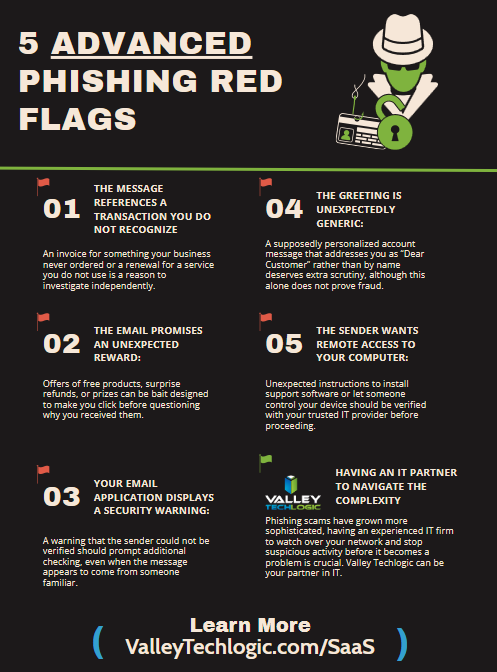
    A representative from Kaseya recently shared with us that AI enabled phishing emails are seeing 25% higher open rates than human crafted variations. While results can vary by campaign, audience, and security training maturity, the takeaway is clear: AI is making phishing more convincing, more scalable, and more profitable for criminals.

    Traditional phishing emails were often easier to spot. They contained awkward wording, strange formatting, vague requests, or obvious spelling mistakes. AI has removed many of those warning signs.

    Today’s phishing emails may reference your company, your vendors, your industry, recent business activity, or a real person inside your organization. They can be short and casual, formal and executive-sounding, or written in the exact tone of a normal business request.

    Even worse, criminals can now generate hundreds of variations quickly. If one version does not work, they can adjust the subject line, tone, timing, sender name, or call to action until something lands. Here are some common variations of phishing scams we’re now seeing as a technology service provider:

    • The message creates urgency, such as “today only,” “final notice,” “immediate action required,” or “payment must be processed now.”

    • The sender asks you to bypass normal processes, especially for payments, password resets, MFA approvals, bank changes, or file access.

    • The email sounds polished but slightly off, especially if the request does not match the sender’s usual behavior.

    • The message includes a link to a login page, shared document, voicemail, invoice, shipping notice, or payment portal you were not expecting.

    • The sender pressures you not to call, not to verify, or not to involve anyone else.

    • The request involves gift cards, wire transfers, ACH changes, cryptocurrency, payroll updates, or sensitive business data.

    We also want to note,accounts payable teams are especially vulnerable because their work already involves invoices, payment requests, vendor communication, banking details, and deadlines. AI gives scammers better tools to blend into that workflow.

    A fake invoice used to be relatively basic. Now, an attacker can create a professional-looking invoice with realistic branding, matching language, convincing line items, and payment instructions that appear normal at first glance. In more advanced cases, criminals may combine fake invoices with compromised email accounts, vendor impersonation, cloned voices, or deepfake video messages that appear to come from an executive, vendor, or finance leader.

    This is where deepfake invoice fraud becomes especially dangerous. The invoice itself may look real, but the larger scam may include an AI-generated voicemail, a realistic video message, or a spoofed email thread that appears to confirm the payment. The goal is simple: make the request feel legitimate enough that accounts payable processes it before anyone verifies the change.

    Here’s how to avoid falling victim:

    • Verify payment changes through a trusted channel. Do not use the phone number or email address included in the suspicious message. Use a known contact from your records.

    • Require secondary approval for new vendors, bank account changes, large payments, urgent wires, and unusual invoice requests.

    • Slow down when a message creates pressure. Urgency is one of the strongest signs that someone is trying to push you into a mistake.

    • Check sender addresses carefully. Look for lookalike domains, extra letters, changed display names, and replies that come from unexpected addresses.

    • Do not approve MFA prompts you did not initiate. Attackers often combine phishing with login attempts and push notification fatigue.

    • Hover over links before clicking, and avoid logging in through links in unexpected emails. Go directly to the known website instead.

    • Train employees with realistic phishing examples, including AI generated messages that look polished and professional.

    • Use modern email security, MFA, endpoint protection, DNS filtering, and identity monitoring to reduce the chances that one bad click turns into a major incident.

    • Build a culture where employees are praised for verifying suspicious requests. People should never feel embarrassed for slowing down a payment or asking for confirmation.

    The bottom line is that AI does not create entirely new fraud. It makes old fraud faster, cheaper, more convincing, and easier to scale. That is why businesses need to stop treating phishing as a problem that only happens to careless people.

    The strongest protection is a combination of technology, training, and processes. Email filtering helps, MFA helps, endpoint protection helps, but for payment fraud, business email compromise, and fake invoice scams, process matters just as much. A quick phone call directly to a known number for the person/company, a second approval, or a strict vendor change procedure can be the difference between catching a scam and wiring money to a criminal.

    Fraud is getting more convincing. Your defenses need to become more deliberate. At Valley Techlogic we are continuously working on future proofing our customers against scams and intrusions, and all of our plans come with cybersecurity built in. Learn more today with a consultation.

    Looking for more to read?

    This article was powered by Valley Techlogic, leading provider of trouble free IT services for businesses in California including Merced, Fresno, Stockton & More. You can find more information at https://www.valleytechlogic.com/ or on Facebook at https://www.facebook.com/valleytechlogic/ . Follow us on X at https://x.com/valleytechlogic and LinkedIn at https://www.linkedin.com/company/valley-techlogic-inc/.

  • Agentic search? Google’s annual conference I/O revealed new features coming to search, and how your personal data may integrate into it

    Agentic search? Google’s annual conference I/O revealed new features coming to search, and how your personal data may integrate into it

    Google’s annual conference I/O (which stands for In/Out) for developers just ended a couple of days ago and with it came a swath of updates meant to get developers excited in the tech that the company will be bringing forth in the near future. AI of course took the main stage and was heavily featured, but the most notable items probably came from the changes to Google’s flagship product, their search engine.

    The word agentic when it comes to AI is tossed around a lot, but what do we really mean when we say agentic will be coming to Google search? Agentic means “someone or something that achieves outcomes independently” and thus far, that’s not something most AI tools are capable. Until the user is there entering a prompt the AI agent or tool is essentially dormant, waiting in limbo to be summoned for a task or query.

    Google and the other tech behemoths in the space would like to change that, instead of waiting for you to ask, Google plans to introduce the ability to have a search that’s ongoing and happening in the background. If you want to stay on top of your favorite teams stats for the season, or to get an update when stocks you have invested in have a major change, you can set up a search that will continuously run and provide updates as they become available.

    For those who like to stay up to date at every moment on their topics of interest this is an intriguing switch from the usual paradigm from “searcher” to just “scanner”, allowing you to catch up with all of your interests over your morning coffee without having to lift a finger. For others, it might be information overload.

    Google is dubbing this feature “Information Agents” and it will be available to Pro & Ultra subscribers as early as this summer. The agents will also be able to do things like scan for tickets to a concert you have been wanting to attend and purchase them automatically when they become available, it can also book services like home repair or pet care on your behalf. In a nutshell, these agents are meant to simplify your day to day and have your tech doing more while you have to engage with the minutiae of everyday life less.

    Not everyone would like to have things removed from their direct – and sole – oversight, however. As with the ChatGPT Finance announcement, some users are skeptical about allowing AI and the companies that back it such a deep and personal look into their private data. To be completely independent of the user Google has said their AI agents may review your emails, calendar events and more so it can make decisions on your behalf. The trade of convenience for privacy may be too much for some users to tolerate.

    Other announcements at I/O included was the immediate release of Gemini 3.5 which included a UI re-design and changes to the chat bot, including more voice options. Another change coming to search is also the ability to have more contextual answers, for example if you ask it about a specific Monet painting it may just show you an image of the painting rather than a text description.

    It should also be noted the news of Google’s sweeping investments in AI also came as Google quietly removed their commitments to reversing climate change, including removing the “net-zero carbon goal” from their website. As has been made abundantly clear, AI progress and climate sustainability are opposing viewpoints at the moment.

    Regardless of how you feel about AI, it is here to stay and businesses that can take advantage of emerging updates and deploy them within their business strategically will be ahead of the game. Valley Techlogic can help you with AI strategies and safe AI deployments that will set your business ahead of the competition, learn more today with a consultation.

    Looking for more to read?

    This article was powered by Valley Techlogic, leading provider of trouble free IT services for businesses in California including Merced, Fresno, Stockton & More. You can find more information at https://www.valleytechlogic.com/ or on Facebook at https://www.facebook.com/valleytechlogic/ . Follow us on X at https://x.com/valleytechlogic and LinkedIn at https://www.linkedin.com/company/valley-techlogic-inc/.

  • Education platform Canvas reached settlement with ransomware group “ShinyHunters” to prevent the release of data affecting 275 million users

    Education platform Canvas reached settlement with ransomware group “ShinyHunters” to prevent the release of data affecting 275 million users

    At the worst possible time, millions of students and educators found themselves locked out of Canvas, the digital backbone of classrooms across the country. What started as a cybersecurity incident quietly detected in late April 2026 exploded into one of the largest educational data breaches on record, hitting right as schools entered finals season.

    Canvas is a cloud-based learning management system (LMS) operated by a company called Instructure. It is a digital hub where teachers post assignments, students submit work, grades are recorded, and classroom communication happens. Its reach is enormous. Canvas counts more than 30 million active users globally and serves over 8,000 institutions as customers. In North America alone, it is used by 41% of higher education institutions, alongside thousands of K-12 schools. When it goes down, millions of people feel it immediately.

    The incident did not appear out of nowhere. Instructure first detected unauthorized activity on April 29, 2026, and began an internal investigation. For a few days, the situation seemed contained. Then, on May 7, everything changed.

    Students logging into Canvas around 1�20 p.m. PDT found something unexpected on their dashboards: a ransom note. The message was signed by ShinyHunters, a well-known criminal hacking group, and it was blunt. It claimed the group had breached Instructure, accused the company of ignoring earlier contact attempts, and threatened to release all stolen data unless affected schools negotiated a ransom settlement through the encrypted messaging platform Tox by the end of May 12, 2026.

    “Instead of contacting us to resolve it, they ignored us and did some ‘security patches,’” the group wrote on user dashboards.

    Instructure took Canvas offline shortly after to contain the damage. The outage disrupted access during a critical period, leaving students and faculty at thousands of colleges and K-12 schools scrambling for course materials, assignments, and communications.

    ShinyHunters claimed to have stolen 3.65 terabytes of data tied to approximately 275 million users across roughly 9,000 institutions worldwide. The list of affected schools included major universities like Columbia, Princeton, Harvard, and Georgetown, as well as large public school systems across the country.

    The breach is considered the largest educational security incident on record by scope and scale. According to Instructure’s own investigation, the stolen data included:

    • Names, email addresses, and student ID numbers

    • Private messages exchanged between students and teachers

    Instructure stated it found no evidence that passwords, dates of birth, government identification numbers, or financial information were compromised. That is meaningful, but the exposure of private messages and identifying information is still significant, particularly given how personally sensitive communications between students and educators can be.

    Instructure issued an apology on May 11 and updated its status page to note that Canvas was back online with no indication of ongoing unauthorized activity. On May 12, the company announced that the stolen data had been “returned” following an agreement with the hackers.

    Cybersecurity experts were quick to note that “returned” data does not mean deleted data. There is no reliable way to confirm that copies were not made or retained before any handover.

    Instructure notified impacted organizations on May 5 and has advised that affected schools will be contacted directly. For students, parents, and staff, the school or institution itself is the recommended first point of contact. The company is also organizing a leadership webinar to share further details about the attack and steps taken to harden its systems.


    If you use Canvas through a school or university, take these steps:

    Enable Multifactor Authentication (MFA) on your Canvas account and any other school platform that offers it. This single step dramatically reduces the risk of unauthorized access even if your credentials were exposed.

    •  Be skeptical of unexpected emails or messages referencing your Canvas account, your school, or this breach. Phishing attempts often follow major incidents and can be convincingly detailed when attackers already have your name and email address.

    Schools and IT administrators should rotate Canvas integrations, API keys, and single sign- on connectors, and review authentication logs for unusual activity between April 25 and May 8, 2026, per guidance from both Instructure and the Federal Student Aid office.

    The Canvas breach is a reminder that education technology has become critical infrastructure, and critical infrastructure is a target. When a single platform serves 41% of North American higher education, a single point of failure becomes a national-scale event. The timing compounded the damage. Finals week is the highest-stakes period of the academic calendar. For students preparing for exams, submitting final papers, or trying to reach professors, even a few hours of outage created real consequences.

    The breach raises important questions about how much sensitive communication is flowing through third-party platforms, and what obligations companies like Instructure have to protect it. Private messages between students and teachers were never meant for anyone else. That data is now out in the world in some form, regardless of what “returned” officially means. Stay alert, update your account security, and watch for follow-up communications from your school’s IT department.

    Valley Techlogic plans include cyber security support and prevention, and we have worked with those in educational space to create customized solutions that take student safety in mind (including content filtering, strategies to protect student data privacy, device security and more). Learn more about our security as a service solutions here.

    Looking for more to read?

    This article was powered by Valley Techlogic, leading provider of trouble free IT services for businesses in California including Merced, Fresno, Stockton & More. You can find more information at https://www.valleytechlogic.com/ or on Facebook at https://www.facebook.com/valleytechlogic/ . Follow us on X at https://x.com/valleytechlogic and LinkedIn at https://www.linkedin.com/company/valley-techlogic-inc/.
  • New malware dubbed “NoVoice” infiltrates the Google Play Store and infects 2.3 million devices

    New malware dubbed “NoVoice” infiltrates the Google Play Store and infects 2.3 million devices

    If you’ve downloaded anything new from the Google Play Store recently you might want to be wary of the extra “features” that may have come along with it. It’s being reported that a new malware dubbed “NoVoice” has infected a number of Apps across the Google Play store.

    The apps it was discovered in were not limited to one genre, the malware was found in cleaners, games, image galleries and more. At launch the apps didn’t request any additional suspicious permissions and worked as intended.

    Longtime cybersecurity behemoth McAfee discovered the malware but it’s not currently being linked to any specific malware group or threat actor, and no one has claimed credit for the attack as of writing. After installation the malware tries to gain root access to your device by utilizing vulnerabilities found in unpatched devices (most of these exploits have been patched between 2016 and 2021) highlighting the importance of keeping your devices up to date on firmware.

    According to the researchers at McAfee the infected payload hitched a ride on what looked like legitimate Facebook SDK classes, which then deployed an encrypted payload hidden inside a PNG before system wiping all traces of itself. If this sounds like a less delightful matryoshka doll in malware form that’s because it is.

    It was also noted by researchers that the malware had built in capacity to avoid certain regions in China if the original app was given permission to detect location. All-in-all researchers noted that the malware would attempt to try 22 known vulnerabilities on the infected device in order to gain root access. It was also discovered the primary goal once it had access was to then steal data from WhatsApp specifically, although it should be noted due to the flexible design of this malware it could have been used to steal other data (this just wasn’t noted during discovery).

    All affected apps have now been removed from the Google Play Store, and a Google representative issued a statement:
    “As an added layer of defense, Google Play Protect automatically removes these apps and blocks new installs. Users should always install the latest security updates available for their device.”

    As NoVoice specifically targeted security flaws that were fixed before 2021, any device that has been updated since that time would be safe from this exploit. Regular patching and security updates are a core feature on every Valley Techlogic plan, we believe this helps:

    • Fix known vulnerabilities before attackers can exploit them
    • Reduce the risk of malware, ransomware, and unauthorized access
    • Keep systems compatible with current security tools and protections
    • Help maintain compliance with security standards and insurance requirements

    Protect your business from threats today with a technology plan from Valley Techlogic, you can learn more about our services and get started here.

    This article was powered by Valley Techlogic, leading provider of trouble free IT services for businesses in California including Merced, Fresno, Stockton & More. You can find more information at https://www.valleytechlogic.com/ or on Facebook at https://www.facebook.com/valleytechlogic/ . Follow us on X at https://x.com/valleytechlogic and LinkedIn at https://www.linkedin.com/company/valley-techlogic-inc/.