
Category: Cyber Security

  • Norton’s Antivirus Software Comes with a Crypto Miner, and They’re Not Alone

    Norton’s Antivirus Software Comes with a Crypto Miner, and They’re Not Alone

    Last week a claim unfolded on Twitter that Norton was installing crypto mining software without authorization on PC’s which then rose to the level of outrage amongst some Norton antivirus software customers.

    The truth on the subject is a mixed bag, while it’s true they are installing a crypto miner on customer machines it’s not active on every machine, customers must authorize the process before the device will begin mining crypto (in this case Ethereum). If you authorize Norton to begin mining cryptocurrency on your device they will setup a wallet for you and after a small cut, and then deposit your earnings there when you meet a certain threshold.

    Norton did make an announcement that they were planning on including a crypto miner within their software before rolling it out to a small number of users last summer, however at the time of writing we’re uncertain any announcement was made when they decided to make it a component for every user.

    Their goal was to provide a “safer alternative” to other sketchy mining programs a user may find on the web. Although we suspect that the cut (15% at the time of writing) they’re receiving from users who opt in is an added bonus.

    Even with the news that you must activate the crypto mining intentionally before Norton will crypto mine on your behalf, many aren’t happy that the application is a default addition to their antivirus services and there Isn’t a clear-cut way to remove it.

    We do have instructions for removing it, you must temporarily turn off Norton’s anti-tamper feature (instructions on how to do so here) and then you’re able to remove the NCrypt.exe from your PC. If you do decide to instead use the crypto miner, it works as others do where it will only begin mining when your computer is idle.

    Norton aren’t the only antivirus software providers including a crypto miner built in either, Avira antivirus (which for transparencies sake has been recently purchased by Norton 360) has also announced Avira Crypto.

    Although the details on Avira Crypto are even more sparse than with Norton Crypto, they don’t currently specify what they’re cut is from the currency you mine for instance.

    It’s also worth noting that the inclusion of crypto mining into these antivirus software has caused other unrelated antivirus software to flag them as potentially malicious. Users currently annoyed by the inclusion believe Norton should be on the same page, that they should be flagging and removing unauthorized crypto miners – not installing their own.

    Also, the fees taken by Norton or Avira stack up with the fees associated with moving the Ethereum out of the wallet they create into one where you can actually use it, which means it can take a while before a user accrues a usable balance (while at the same time increasing wear and tear on their machine and adding to their power bills).

    All and all it’s a pretty mixed bag and for users who are not yet savvy in the crypto mining space, maybe not the best additive to a software meant to protect their machines from destructive intrusions.

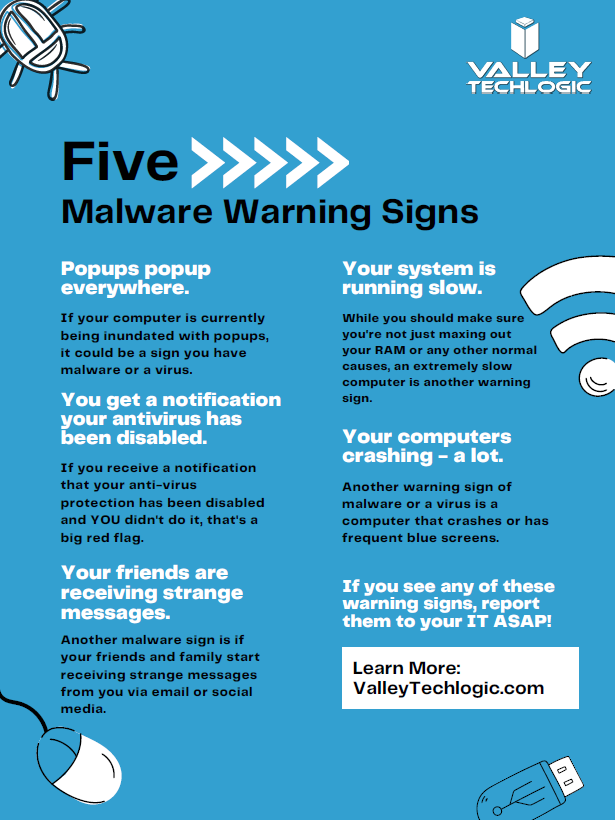
    Speaking of destructive inclusions, we have created this chart with some tell-tale signs your computer may have a virus or malware. It’s in a format meant for printing and can even be printed as a poster.

    Small Version of Our Malware Warning Signs Poster
    Click to grab the full (poster) sized format.

    If you’ve ever experienced a malware attack in your office, Valley Techlogic can help. We have assisted businesses in their recovery, or if you’ve been lucky enough to avoid it so far, we can help make sure things stay that way. Cybersecurity coverage is included in all of our plans. Learn more today in a quick consultation.

    Looking for more to read? We suggest these other articles from our site.

    This article was powered by Valley TechLogic, IT service provider in Atwater, CA. You can find more information at https://www.valleytechlogic.com/ or on Facebook at https://www.facebook.com/valleytechlogic/ . Follow us on Twitter at https://x.com/valleytechlogic.

  • LastPass say they didn’t leak your password, however some users still received alarming alerts

    LastPass say they didn’t leak your password, however some users still received alarming alerts

    Yesterday, a number of LastPass users received alarming alerts in their email inbox that their passwords – including their master password – had been compromised. The news quickly spread across the internet, starting with forums, and then making its way to Twitter where it was picked up by larger news outlets.

    LastPass immediately denied that a breach had occurred within their organization and at first indicated that the alerts were happening to users who were the victims of “credential shuffling”. That means these users had reused their passwords on other websites who may have had a breach in the past, and now bots trolling the internet for compromised accounts have stumbled upon their password vault credentials.

    This didn’t end up being the case either, but it is a good reminder NOT to password shuffle, especially with the master password for your password vault (if any password should be unique – it should be that one).

    As of this morning LastPass determined that the alerts were sent in error by systems that were set up to be too stringent. They’ve indicated they now adjusted the alerts systems so inaccurate alerts will not be sent again. They also clarified that they don’t store user passwords on their own servers, and that they work on a “zero knowledge” security model which means they are not able to see your master password at all.

    The fact that this news took off in a flash may be indicative of the heightened awareness users have around the security of their data, especially those who currently use a password manager as part of their security repertoire. Even if the alerts occurred in error that may be cold comfort to the scare those users experienced.

    To us, it’s a reminder that the best cybersecurity efforts are multi-layered. We believe it’s equal parts implementation of security measures, monitoring of those measures, and behavioral changes on the part of the users.

    Even if the alerts that occurred yesterday were the result of a system issue not a security issue, we think the users that responded had the right idea when they chose to investigate. It’s also a good idea to change your password if you get a security alert, even if it turns out to be a false alarm. It won’t hurt anything to take that extra step to protect yourself, the old adage “Better Safe Than Sorry” rings especially true when it comes to cybersecurity threats.

    We created this resource on the topic of good password hygiene that you can keep to review, or even pass along to your co-workers/employees.

    Small Version of the Strong Password IG
    Click to view the full size.

    Finally, even if the unthinkable occurs and your passwords are leaked, again a multi-layered approach will protect you. You should enable 2-factor/multi-factor authentication when and where you can. So if someone does get your password somehow, they still will be blocked from logging in.

    If the security measures in your workplace aren’t up to snuff or you’re interested in cybersecurity training for your employees, Valley Techlogic can help. Boosting the security measures for your business and providing a digestible cybersecurity training program for your employees is included as part of our technology service plans. Schedule a free consultation with us today to learn more.

    Looking for more to read? We suggest these other articles from our site.

    This article was powered by Valley TechLogic, IT service provider in Atwater, CA. You can find more information at https://www.valleytechlogic.com/ or on Facebook at https://www.facebook.com/valleytechlogic/ . Follow us on Twitter at https://x.com/valleytechlogic.

  • If you’ve never heard of the Log4J vulnerability, you’re probably at risk

    If you’ve never heard of the Log4J vulnerability, you’re probably at risk

    News is moving fast on the Log4J vulnerability, also known as “Log4shell”. It was first discovered in the video game Minecraft, developers realized hackers could exploit the vulnerability to gain access to the targeted computer and take it over. They quickly released a patch but also made a disclosure that brought the exploit to the public’s view.

    The Cybersecurity & Infrastructure Security Agency (CISA) has now made a running repository that lists all of the software and devices vulnerable to this exploit. There you will find guidance on patching the effected products.

    So, what is the Log4J vulnerability and what does it do?

    It all stems from the building blocks that are used when a programmer is creating their code. Programmers will take bits of code that commonly available and used to act as a foundation for the program they’re trying to write, and in this case one of those foundational bits of code was Log4J. Log4J is used by Java to create a log of activity for the device it’s running on. It copies everything that happens as the program runs, and it makes sense that the vulnerability was initially discovered in Minecraft (a Java based game).

    This communicative bit of code is found in many different programs, which is why it could be devastating if it was widely exploited. Hackers would be able to send a message to the “Log4J” effected product giving it commands. This would essentially allow them to take over the device and have full access.

    Minecraft Isn’t the only thing based in Java either, Java is an extremely popular programming language and bits of it can be found in almost everything. Created in 1995, Java can be found on everything from your own personal laptop to the supercomputers used to solve complex scientific equations. 9937 companies openly report including Java in their tech stack, including Google, Airbnb, Amazon and more.

    Java is also the preferred language for mobile applications, such as Android. Any business interested in having a mobile facing application (which they absolutely should considering mobile devices command the highest percentage of the worldwide web traffic at 54.8%) will need to utilize Java to accomplish it.

    This is so much to say, Java is in nearly everything which makes an exploit that targets a common component of it a recipe for disaster.

    All is not lost however, now that the exploit has been discovered many businesses are working furiously on patches and notifying their customers. You can check the CISA link found at the beginning of this article to keep track of what’s being done by specific businesses.

    Click to open the full size version.

    This ordeal is a good reminder to stay up to date on patches that are offered by the software you utilize, but if you’re running a business, orchestrating patching across many different devices company wide can be much more difficult.

    Valley Techlogic offers preventative maintenance in all of our service plans, as well as disaster recovery services if the unthinkable does occur. Learn more today by scheduling a short consultation with us.

    Looking for more to read? We suggest these other articles from our site.

    This article was powered by Valley TechLogic, IT service provider in Atwater, CA. You can find more information at https://www.valleytechlogic.com/ or on Facebook at https://www.facebook.com/valleytechlogic/ . Follow us on Twitter at https://x.com/valleytechlogic.
  • Hackers and the holidays, US government warns ransomware doesn’t take days off

    Hackers and the holidays, US government warns ransomware doesn’t take days off

    As you prepare to take some time off to enjoy with your families (especially if a certain health crisis kept the festivities to a minimum in 2020) it’s important to take some steps to make sure your business is still protected in your absence.

    The Cybersecurity and Infrastructure Security Agency (CISA) issued an advisory yesterday to businesses and consumers alike, warning that hackers often take advantages of holidays and other times people may let their guard down to wreak more havoc.

    The advisory included a warning of a possible increase on the following cyber threat events:

    1. Phishing attacks: That email from your Aunt Beth seeing if you’re going to bring the green bean casserole with a “Google Form” to check it off may not be what it seems to be.
    2. Fraudulent site spoofing: Especially for sites that may be seeing increased traffic due to holiday shopping (Black Friday anyone?).
    3. Unencrypted financial transactions: An easy way to check, is to look for the S in HTTPS, don’t enter your financial data into unencrypted websites.

    Beyond attacks aimed at individuals, attacks aimed at businesses also tend to rise during the holidays and on weekends.

    Such was the case for the attack on Kaseya, which occurred over Fourth of July weekend in 2021, and the Colonial Pipeline hack happened during Mother’s Day weekend the same year. Hackers realize there is less coverage on the weekend and during Holidays and they have taken advantage of it to great success.

    It’s not just large businesses that are a target either, many wannabe hackers have day jobs too and more time on their hands during the holidays to target businesses that could be local to them. That includes yours.

    So, here’s a list of things to check off before you leave the office this week to enjoy some well deserved time off.

    Holiday Crisis Checklist
    Click to view the full size version.

    As you can see, our number one recommendation is knowing who is going to cover your business if a cyber event does happen while everyone is home for the holidays. If you try to think of who that person is and you either come up empty or maybe it’s you, that’s a problem.

    Another problem is if your normal IT coverage is on a one time or break fix solution basis. The service you normally use could either be too swamped themselves to help you during the holidays, or maybe they’re taking time off too and are simply unavailable to help you.

    This is where having a contract with a technology service provider could really save the day during a crisis. When you have a contract with a business to provide your technology services, they’re bound by the service level agreement (SLA) you sign at the start of service. They will be better equipped to help your business if there’s a crisis – even during the holidays.

    If you’re in the Fresno, Modesto, Sacramento or anywhere else in the Central Valley and aren’t really sure who you would turn to if a technology crisis occurred during the holidays, Valley Techlogic is here for you. Learn more today.

    Looking for more to read? We suggest these other articles from our site.

    This article was powered by Valley TechLogic, IT service provider in Atwater, CA. You can find more information at https://www.valleytechlogic.com/ or on Facebook at https://www.facebook.com/valleytechlogic/ . Follow us on Twitter at https://x.com/valleytechlogic.

  • Cybersecurity Maturity Model Certification 2.0 has been announced, what it means for you and your business

    Cybersecurity Maturity Model Certification 2.0 has been announced, what it means for you and your business

    If you’re a contractor or subcontractor for the Department of Defense (DoD) you probably at least have an awareness of the evolving situation surrounding the CMMC (Cybersecurity Maturity Model Certification) program, or maybe you’ve even begun the self-assessment process.

    Announced summer of 2019, version 1.0 was released January 31st, 2020, and a 5 year roll out was planned to get DoD contractors and subcontractors compliant with the framework. The framework is based on the security controls found in the National Institute of Standards and Technology (“NIST”) Special Publication (“SP”) 800-171, with many of the security controls found in CMMC having a direct correlation to a control found in NIST 800-171.

    While the initial CMMC framework was aimed at bringing defense contractors up to speed in their cybersecurity efforts to protect critical Controlled Unclassified Information (CUI), the use of the broad term CUI instead of the defense specific Covered Defense Information (CDI) phrase may indicate that this framework will extend beyond just defense contractors in the future.

    The controls found in NIST are applicable to businesses of all sizes and in all sectors so following the CMMC or NIST frameworks whether or not you’re defense contractor/subcontractor will mean your business will be well protected and compliant with rules and regulations set by your vendors, clients, and services for your business such as cybersecurity insurance.

    In it’s original iteration there were 5 maturity levels found in CMMC, with levels 1-3 really closely following NIST and 4-5 going beyond the scope of what NIST covers. They were described as “maturity levels” as they were meant to measure the maturity of the cybersecurity practices found within your organization.

    For most defense contractors, reaching level 3 of CMMC would be an ideal goal. Levels 4 and 5 covered practices outside the scope of most business’s and would require more specialized (and expensive) security practices. Even in version one of CMMC contractors were allowed to self-certify for maturity level 1, but beyond that would require outside certification. The waiting list to receive that certification is long, so planning to implement the required cybersecurity measures and getting on the waiting list to be certified ASAP is a good idea.

    Now, as of November 4th the DoD has announced an update to CMMC. Version 2 may be removing two of the levels and some of the security measures that were unique to CMMC framework, making the framework match NIST even more closely. Below is the chart we have created with the outlined changes as we know them and as of this posting.

    CMMC Version 1 and 2 Chart
    Click to view the full size.

    This is an evolving situation and as the rollout progresses it’s imperative that businesses that receive DoD contracts begin or continue to increase their efforts in becoming CMMC certified, which may mean drastically increasing your cybersecurity efforts across the board.

    Valley Techlogic has experience in helping businesses meet the goals found within the CMMC framework and we’re ready to help your business meet your certification and cybersecurity goals today. Click here to schedule a quick consultation to find out more.

    Looking for more to read? We suggest these other articles from our site.

    This article was powered by Valley TechLogic, adns, n IT service provider in Atwater, CA. You can find more information at https://www.valleytechlogic.com/ or on Facebook at https://www.facebook.com/valleytechlogic/ . Follow us on Twitter at https://x.com/valleytechlogic.
  • How much are you worth on the Dark Web?

    How much are you worth on the Dark Web?

    Not you specifically, but the data that makes up your online activities and private details? What about your various web accounts, for example did you know a hacked Netflix account with 12 months of service is worth $44 on the Dark Web as of 2021?

    We know the Dark Web is a nebulous concept and most of the people we talk to really don’t feel as though it has much to do with them. There’s even those that have resigned themselves to the fact their data is just “out there”, but take solace that in the flux of so many people who experience identify theft (1, 387, 615 reported cases in 2020) there’s just no way a hacker would ever reach them personally.

    If you’re a business owner this is of course, a crock of baloney. While there are many business owners in the US, their numbers pale in comparison to the vast swafts of people who don’t own a business and thereby don’t have valuable employee and financial data within their purview. The fact is by simply owning a business, you’re more vulnerable to being a target of identity theft.

    Business identity theft and consumer identity theft typically occur with the same goal in mind, financial gain for the bad actor. However, business identity theft carries a much larger trickle-down effect. It’s not only your own data that’s at risk, there’s also that of your employees and your business itself.

    Business size doesn’t affect the rate at which you’ll be targeted either, in fact during the COVID pandemic, business identity theft soared across the board.

    This all leads us back to what hackers hope to gain and what your financial data and other pertinent details and accounts are really worth on the dark web, we’ve created this chart with some notable items, but you can find the whole list for 2021 here:

    Click to grab the full size version.

    As the website above states, the quantity of these items found on the dark web also has grown considerably in the last year. It’s predicted cyber theft will cost the world $10.5 trillion annually by 2025. Cyber crime is more profitable than the global drug trade at this point in time.

    So instead of thinking “it won’t happen to me” you should begin considering what you will do when it does happen to you, or even better – what you can do to stop it.

    For instance, at Valley Techlogic we provide all of our customers with Dark Web Monitoring as a routine part of their services with us.

    Dark web monitoring won’t stop your details from being leaked but it will help you monitor and prevent further damage. If your credentials are made available to hackers and you’re aware of it, it’s a lot easier to change them ahead of any damage being done to your accounts and systems.

    You can also partner with an IT provider who has a cyber security stack that exceeds what you could procure on your own. This allows you to take advantage of a robust cyber security package without trying to manage and absorb the cost yourself, allowing you to protect your business and even save money.

    Finally, your provider can help you comply with a cybersecurity framework recommended by the US government, such as NIST or CMMC. This will offer you the best most comprehensive protection from business identity theft.

    Valley Techlogic can assist you with all of these recommended cybersecurity practices. Learn more by taking a quick 10 minute discovery call with one of our tech experts.

    Looking for more to read? We suggest these other articles from our site.

    This article was powered by Valley TechLogic, an IT service provider in Atwater, CA. You can find more information at https://www.valleytechlogic.com/ or on Facebook at https://www.facebook.com/valleytechlogic/ . Follow us on Twitter at https://x.com/valleytechlogic.

  • 10 scary cybersecurity statistics business owners need to know

    10 scary cybersecurity statistics business owners need to know

    Halloween is approaching and we thought it would be appropriate to cover some bone chilling cybersecurity statistics business owners NEED to know to protect their business.

    Cybersecurity is something we all know we need to do more about but also don’t like to think about, however for business owners’ avoidance won’t make the threats any less real.

    Take a look at our web of cybersecurity statistics and read on to learn how they can make a mess for your business (and what you can do to fix it).

    Click to view the full size version.

    While these statistics are scary, we already suspect you’re thinking “it won’t happen to me”. The reasons business owners come to this conclusion are numerous but the top 3 we’ve encountered are.

    1. My business is too small.
    2. I’m not in a sector that’s targeted by hackers.
    3. Even if I was hacked, I don’t have anything they would want.

    That last one is a real headscratcher for us. What business operates without any financial data? What about your personal data and that of your employees? Your customers? That’s all valuable data on the dark web.

    The scariest statistic of all that wasn’t included in our chart is that 60% of businesses fail following a cybersecurity event.

    Preventing an attack is crucial for your business, remediating an attack after the fact is not a clear-cut solution. Usually not all of your data can be recovered, you can’t make up for the lost time spent dealing with the attack, and if it becomes public your reputation may never be what it once was.

    There are easy solutions you can put in place today that will reduce your risk dramatically.

    1. Educate your employees about phishing emails, this is one of the biggest sources of threat events.
    2. Ensure two-factor or multi-factor authentication is required on company systems and devices.
    3. Have a company wide password policy that includes not sharing your password with others and coming up with complex yet memorable passwords that can’t be brute forced by a would be attack.

    If it’s all overwhelming and you don’t know where to start, we don’t blame you. Navigating the complicated world of cybersecurity is really something that business owners should let a professional handle. If you’re in the Central Valley, Valley Techlogic can be your partner in security and more. Learn more today.

    Looking for more to read? We suggest these other articles from our site.

    This article was powered by Valley TechLogic, adns, n IT service provider in Atwater, CA. You can find more information at https://www.valleytechlogic.com/ or on Facebook at https://www.facebook.com/valleytechlogic/ . Follow us on Twitter at https://x.com/valleytechlogic.

  • 5 Ways “Tribal Knowledge” Sabotages Your Cybersecurity Efforts

    5 Ways “Tribal Knowledge” Sabotages Your Cybersecurity Efforts

    Even if you’re unfamiliar with the phrase “tribal knowledge” you’ve still most likely participated in it. Tribal knowledge is anything in your workplace people just “know”. If you have a particular co-worker that gets upset if the AC is turned down below 75 so no one does, that’s tribal knowledge. If the snacks in the breakroom are first come first serve and no one can claim dibs, that’s also tribal knowledge.

    Tribal knowledge is anything in your workplace that is common knowledge and is not documented. If the rules are posted somewhere it goes from being tribal knowledge to policy, and when it comes to the technology in your business, it is much more secure to rely on policy than tribal knowledge.

    Having policies for your technology holds everyone in your organization accountable. No one can claim they didn’t know the rules if the rules are clearly outlined and defined. Having effective policies are also necessary for maintaining your compliancy with federal rules regarding cybersecurity and business and for meeting the requirements for things like cybersecurity insurance.

    Here are the five ways tribal knowledge typically sabotages your cybersecurity efforts:

    1. The rules are loosely applied. If somethings not policy, then it can be difficult to make sure everyone is on the same page. A new hire will not be aware of your rules from the start and others may feel the rule doesn’t apply to them because they haven’t been strictly told it does.
    2. The rules are up to interpretation. What you think something means and what someone else may interpret something meaning can be vastly different, especially when being communicated person to person where some of it is probably getting lost in translation.
    3. You have no documentation. If the guidelines for online safety in your business are communicated verbally, you have no documentation for how or when they’re being applied. If you have a ransomware attack and you go to your insurance company without documentation, you’ll most likely be turned down.
    4. You’re not keeping up with the times. If you have employees stuck on the way things “have always been done” instead of evolving policies to fit your workspace as it grows, you’re going run into a problem if you ever need to implement comprehensive cybersecurity changes in the future.
    5. You’re losing access to relevant data. Policies help you document your processes, and that documentation is data that could help your business grow. If a certain activity is not working or could be working better, the documentation you’re creating with comprehensive policies could help you find out sooner which will save your business time and money.

    In addition to these five tips, we’ve also created this PDF for four easy things to implement in your business (click to download).

    Four Policy Changes To Start With
    Click to download.

    These items will get you on the right track but if you feel like it’s time to get serious about cybersecurity, it’s best to leave it to the professionals. At Valley Techlogic, we have over 15 years in the cybersecurity space. We have a robust cybersecurity package that can be used standalone to leverage our cybersecurity stack if you already have an IT team in place or in conjunction with our IT service plans if you don’t currently have reliable assistance for your business’s technology. Schedule a consult today to learn more.

    Looking for more to read? We suggest these other articles from our site.

    This article was powered by Valley TechLogic, adns, n IT service provider in Atwater, CA. You can find more information at https://www.valleytechlogic.com/ or on Facebook at https://www.facebook.com/valleytechlogic/ . Follow us on Twitter at https://x.com/valleytechlogic.

  • October is National CyberSecurity Awareness Month, Our Checklist Will Get You Started

    October is National CyberSecurity Awareness Month, Our Checklist Will Get You Started

    Every October the CyberSecurity & Infrastructure Security Agency (CISA) releases a list of resources and tips for National CyberSecurity Awareness Month – which is now in its 18th year.

    This year’s theme is “Do Your Part. #BeCyberSmart”. There has been an onslaught of news worthy ransomware attacks, DDoS attacks and data breaches (up 38% this year compared to last) in 2021 and there has never been a better time to address what the average person or business can do so they don’t end up as part of these statistics.

    We’ve created this checklist so you can see if you’re following the right path to keep your business safe from outside intruders.

    Click to download the online capable version.

    Cybersecurity requires ongoing maintenance to succeed. Following simple safety steps will help but it’s important not to disregard active threats to your business from the outside.

    Ongoing employee training is one way to combat those threats, cybersecurity training has evolved to include bite size doses of good advice for your employees that could make the difference between inadvertently falling for a phishing scam or attack attempt and reporting it to your IT team as they should. 95% of data breaches involve human error.

    It can also be important to have a team behind you making sure all of your company devices are maintained and updated, even if that outdated Windows 7 computer that sits in a corner is barely used it can still be a threat to your business. Older devices with outdated software can act as a gateway to allow bad actors into your business.

    More advanced maintenance such as enabling two-factor or multi-factor authentication on company accounts can be another important step to keeping threats out. If someone gets your password from another company’s data breach (which happens all the time) that phone pop up could prevent you from being hacked.

    Finally, having a comprehensive backup program for your businesses data is the final shield against cyber threats. We’re unique in that we offer not only active backups but archival backups as well. The archival backup is “Write once, Read many” which means you can look at the data as often as you like but it can’t be edited or deleted.

    A bad actor may find your unbacked up data, and they may gain access to your active backups, but that archival data is virtually bullet proof. For your important files, the ones that must not be deleted at any cost, having that backup there and ready if you need it is the peace of mind most of us would not want to be without (learn more about our backup program here).

    If this article has gotten you thinking about what you can do to improve your cybersecurity processes or even that you need to create a plan to get there, we’d love to help. Schedule a discovery call with us to learn more about how Valley Techlogic can help you be #CyberSmart.

    Looking for more to read? We suggest these other articles from our site.

    This article was powered by Valley TechLogic, adns, n IT service provider in Atwater, CA. You can find more information at https://www.valleytechlogic.com/ or on Facebook at https://www.facebook.com/valleytechlogic/ . Follow us on Twitter at https://x.com/valleytechlogic.

  • Massive DDoS Attacks Cripple VoIP Services

    Massive DDoS Attacks Cripple VoIP Services

    If you use VoIP in your business, you may have been affected by service outages so far this week.

    That’s because Bandwidth.com, a major hosting provider for VoIP services such as Accent, Ring Central, Twilio and more has been under assault by a major distributed denial of service (DDoS) attack. While they’re working tirelessly to reroute call streams, as of Tuesday outages were still occurring nationwide.

    Distributed Denial of Service (DDoS) attacks are not a new occurrence in the VoIP world, hackers regularly target VoIP services in an effort to gain a ransom to make the attacks stop. Canadian VoIP provider, VoIP.ms, has been under siege since last week by a DDoS attack being performed by the hacking group REvil.

    REvil, a Russian linked ransomware gang, was also responsible for the attacks on Kaseya that made major news in July. They are demanding $4.5 million from VoIP.ms to end the attacks but so far VoIP.ms is holding firm and not giving in to the demands.

    You may be wondering what happens during a Distributed Denial of Service (DDoS) attack or even what a DDoS attack is. During a DDoS attack hackers flood the target networks with service requests, bogging down the systems until they either slow to a crawl or go offline completely due to the overload.

    To put some context behind it, Cloudflare a cybersecurity oriented service provider that helps websites mitigate DDoS attacks were themselves hit by a DDoS attack last month that served their website 17.2 million requests per second. The real target of the DDoS attack, a financial customer of Cloudflare, was served 330 million attack requests in seconds. Most websites and online servers cannot bear the brunt of that many requests instantaneously.

    VoIP providers are an easy target for ransomware, cutting off communications to the outside world for those who are affected is a tangible problem that creates a heightened sense of urgency. The same urgency cannot be replicated from your business’s website being down for a while, though the loss of revenue that may occur from that should not be overlooked. For some business’s that loss can equal as high as $250,000 hourly.

    You may be thinking, I can’t have my phones go down I’ll just switch back to a landline provider even if the cost is higher and it would lack many of the features acquired with VoIP. I’m sorry to say It would do you no good.

    Nothing is truly cut off from the web these days, even your typical landline phone utilizes a web-based connection somewhere down the line. POTS aka Plain Old Telephone Service which performed phone services over copper wires is going the way of the dodo in most places.

    The FCC even called for a mandatory termination of POTS lines In 2014. As of 2018 only 5% of the country was landline only.

    To sum it up, avoiding the internet when it comes to making phone calls is no longer a possibility. With that said we understand that having your phone lines down is disruptive and unnerving. We’ve created this checklist with steps to take if you find your phone service down.

    If you don’t have a service provider to reach out to in the event of a service outage, we can help. We are proud of our VoIP service solutions and the reliable uptime we maintain for our clients. You can learn more about our VoIP services here. We even have a promotion for new customers. ?

    Looking for more to read? We suggest these other articles from our site.

    This article was powered by Valley TechLogic, an IT service provider in Atwater, CA. You can find more information at https://www.valleytechlogic.com/ or on Facebook at https://www.facebook.com/valleytechlogic/ . Follow us on Twitter at https://x.com/valleytechlogic.