

Tag: spam prevention

  • Email scams have grown more sophisticated and realistic, here are 5 ways you can still tell

    Email scams have grown more sophisticated and realistic, here are 5 ways you can still tell

    Spotting an email scam used to come with familiar advice: look for spelling mistakes, awkward sentences, and messages that sound a little off. Those clues can still help, but they are no longer enough. Criminals can use artificial intelligence to write convincing messages and correct the language errors that might otherwise give them away. The FBI has warned that these tools are making fraudulent messages more believable and easier to produce.

    For businesses, the danger often arrives looking like an ordinary part of the workday. A vendor sends an invoice, a manager requests a purchase, or an account notification asks you to confirm some information. Scammers imitate these routine interactions because the requests can seem reasonable at first glance.

    You cannot prove that every email is safe just by looking at it. However, these five warning signs can help you recognize when to stop and verify before taking action.

    1. The sender’s details do not match who they claim to be.

    A familiar display name does not establish who actually sent an email. Expand the sender’s information and examine the full email address, especially the domain after the @ symbol. Watch for substituted letters, extra characters, or an unfamiliar domain attached to the name of a company you recognize. Criminals use these small differences to make impersonation attempts look legitimate.

    Compare the address with contact information you already trust rather than relying on the signature in the message. However, even a correct address is not a guarantee of safety. Criminals can compromise genuine business email accounts and use existing conversations to make fraudulent requests seem credible. Treat the sender check as one precaution, not permission to stop checking.

    1. The message pressures you to act before you can think.

    An email threatening immediate account suspension or demanding an urgent payment deserves extra scrutiny. Scammers use urgency, fear, and intimidation to push people into acting before they investigate. The message may sound authoritative and professional while still trying to rush you into a bad decision.

    Be particularly cautious when the sender discourages you from checking with anyone else. In one impersonation scheme documented by the FBI, fraudulent invoices instructed recipients to request payment instructions by email rather than telephone, helping the scammers avoid independent verification. A request that makes it harder to confirm the facts should give you a reason to pause.

    1. The email sends you somewhere unexpected through a link, attachment, or QR code.

    A document-sharing notification or account alert may lead to a fake sign-in page rather than the service it claims to represent. Criminals can copy the appearance of legitimate websites to collect the passwords or financial information people enter. An unexpected attachment also deserves scrutiny, even when it is presented as an invoice or another routine business document.

    QR codes deserve the same caution as clickable links. The FTC warns that scammers include them in emails and text messages to direct people to fraudulent sites. For an unexpected account notice, open the service through a trusted bookmark or its official app instead of following the message’s instructions. Confirm an unexpected document with the sender through a separate, trusted contact method before opening it.

    1. The sender wants your password, sign-in code, or sensitive business information.

    A message claiming to come from technical support may sound helpful while asking you to hand over account access. Requests to reply with your password should be treated as a serious warning. Employees should not send passwords or sensitive information by email simply because a message appears to come from a manager or another trusted person.

    Be just as protective of one-time sign-in codes. Scammers may claim they need a code to investigate suspicious activity or fix an account problem, when their actual goal is to access the account themselves. Do not send someone a code used to authorize your login. Contact your IT provider or the relevant organization through an established channel to verify the request.

    1. The request changes a normal business process, especially where money is involved.

    An email does not need a malicious link or attachment to cause damage. A convincing request to send a legitimate payment to a different account can be enough. Be cautious when a vendor suddenly changes banking details, a manager requests an unusual purchase, or someone asks you to bypass the usual payment approval process. These are situations associated with business email compromise scams.

    Verify changes to payment instructions by calling a number already in your records, not a new number supplied in the email. Keep any required second approval in place, even when the request appears to come from someone senior. An existing email conversation should not replace independent confirmation when the destination of your money changes. We also have this free resource with five more items to look out for when it comes to phishing scams:
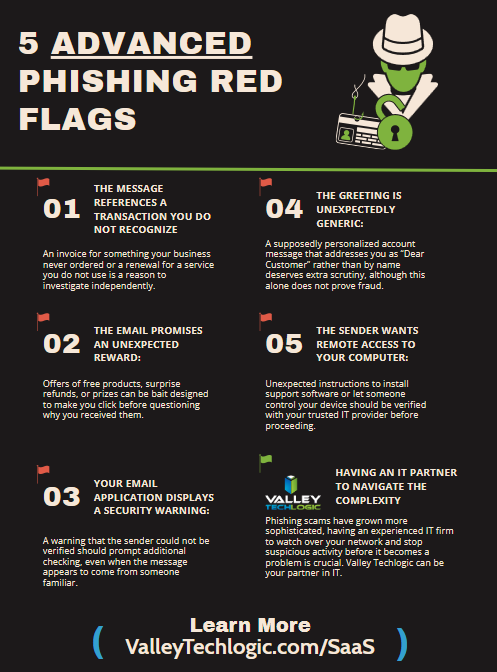
    Recognizing suspicious emails should be a shared business practice, not a test employees are expected to pass without support. Give your team a clear process for checking unusual requests and reporting concerns. Regular training and an incident response plan help turn that expectation into something people can actually follow.

    At Valley Techlogic, we help businesses strengthen their defenses with email and phishing protection, employee security awareness training, simulated phishing exercises, endpoint protection, and ongoing security monitoring. These services combine technical safeguards with practical preparation for the people using your systems every day.

    Your employees should not have to make every security decision alone. Reach out to us today to discuss your current protections and how we can help your business reduce its exposure to phishing and other online scams.

    This article was powered by Valley Techlogic, leading provider of trouble free IT services for businesses in California including Merced, Fresno, Stockton & More. You can find more information at https://www.valleytechlogic.com/ or on Facebook at https://www.facebook.com/valleytechlogic/ . Follow us on X at https://x.com/valleytechlogic

  • DKIM? DMARC? How to stop scammers from using your company’s domain for nefarious purposes

    DKIM? DMARC? How to stop scammers from using your company’s domain for nefarious purposes

    You have probably heard the terms SPF, DKIM, and DMARC thrown around during conversations about email security. They sound technical, and it can be tempting to assume they are only relevant to large companies or IT departments.

    In reality, these protections matter to every business that uses email. Without them, scammers may be able to send fraudulent messages that appear to come from your company’s domain. They can impersonate executives, request payments, distribute malware, or trick customers into revealing sensitive information.

    Even if fraudulent email never touches your actual email system, your company’s name and reputation can still take the hit. Starting with DMARC, which stands for Domain-based Message Authentication, Reporting, and Conformance.

    DMARC works alongside two other email authentication technologies:

    • SPF, or Sender Policy Framework, identifies which servers are authorized to send email for your domain.
    • DKIM, or DomainKeys Identified Mail, adds a digital signature that helps prove an email was authorized and was not altered in transit.

    Together, these technologies give receiving email systems a way to determine whether a message claiming to be from your domain is legitimate.

    So how does domain spoofing work?Email was not originally designed with strong identity verification. In many cases, a scammer can place your company’s domain in the visible “From” field of an email without gaining access to your Microsoft 365, Google Workspace, or other email account.

    To the recipient, the message may appear to come from:

    The scammer might then request a wire transfer, send a fake invoice, ask an employee to purchase gift cards, or direct a customer to a fraudulent login page. This is known as domain spoofing. It is different from an attacker breaking into an actual mailbox, but it can still be extremely damaging.

    Next, SPF is a DNS record that lists the email services allowed to send messages on behalf of your domain.

    For example, if your company uses Microsoft 365, your SPF record should authorize Microsoft’s mail servers. If you also use a marketing platform, ticketing system, or invoicing application, those systems may need to be included as well. When a receiving mail server gets a message claiming to come from your domain, it can compare the sending server against your SPF record.

    A properly configured SPF record helps identify unauthorized senders. However, SPF alone is not enough. It can fail when messages are forwarded, and it does not always protect the address users see in the From field.

    Lastly, DKIM adds a cryptographic signature to outgoing email.

    The sending platform uses a private key to sign the message. The matching public key is published in your domain’s DNS records. Receiving systems can use that public key to verify that the message was authorized by your domain and that important parts of the email were not modified after it was sent.

    DKIM is especially important for cloud email platforms and third-party services that send email on your behalf.

    If your company uses services such as email marketing tools, billing platforms, customer relationship management systems, or help desk software, each service may require its own DKIM configuration. DMARC brings SPF and DKIM together and tells receiving email systems what to do when authentication fails.

    A DMARC policy can instruct the receiving system to:

    • Deliver suspicious messages to spam or quarantine
    • Reject unauthorized messages completely

    DMARC also provides reporting. These reports can show which systems are sending email using your domain and whether those messages are passing authentication. This visibility is extremely valuable. It can help uncover forgotten applications, configuration problems, and unauthorized attempts to impersonate your business.

    Many companies publish a DMARC record with a monitoring-only policy and never move beyond it. A monitoring policy is a good starting point, but it does not instruct receiving mail systems to block spoofed messages. It mainly collects information. Businesses are often hesitant to enforce DMARC because they are concerned about accidentally blocking legitimate email. That concern is valid.

    A company may have several systems sending email, including:

    • Microsoft 365 or Google Workspace
    • Marketing, accounting, support, scheduling, and website platforms

    If those systems are not identified and configured correctly, moving directly to a strict DMARC policy can cause legitimate messages to fail. The right approach is to monitor first, fix authentication issues, and then gradually increase enforcement. A proper implementation usually happens in stages.

    First, your IT provider should inventory every platform that sends email using your domain. SPF and DKIM should then be configured for each legitimate service.

    Next, DMARC reporting should be enabled so your team can review authentication results and identify unknown senders.

    Once legitimate traffic is consistently passing authentication, the DMARC policy can be moved from monitoring to quarantine. After additional review, it can be changed to reject. This staged approach reduces risk while steadily improving protection.

    There are common pitfalls to implementing these protections in your business. One of the most common mistakes is having multiple SPF records. A domain should generally have only one SPF record, with all authorized senders included in that record. Another common problem is exceeding SPF lookup limits. Adding too many services can cause SPF validation to fail, even when the record appears correct. Other issues include expired DKIM keys, marketing systems that were never authenticated, and DMARC records that remain in monitoring mode for years.

    Email authentication is not a one-time project. It should be reviewed whenever your company adds or removes a system that sends email. Does DMARC stop every scam email ? No, no single technology stops every threat.

    DMARC is highly effective at reducing direct domain spoofing, but attackers may still register lookalike domains. For example, they could replace a letter in your company name or add a word such as “billing” or “support.” Attackers can also compromise real employee mailboxes through phishing, stolen passwords, or weak multifactor authentication.

    That is why DMARC should be part of a broader email security strategy that includes:

    • Multifactor authentication and strong account security
    • Employee training, email filtering, and ongoing monitoring

    DMARC protects your domain’s identity. It does not replace the need to secure the accounts and people using it. When scammers impersonate your domain, the damage can extend beyond a single fraudulent email. Customers may lose confidence in your company. Employees may become hesitant to trust legitimate messages. Vendors may question payment requests, and your domain’s reputation may suffer with major email providers.

    SPF, DKIM, and DMARC help prove that legitimate email is really coming from your business. They also make it much harder for attackers to use your domain as a disguise.

    Valley Techlogic can review your current email authentication setup, identify unauthorized sending sources, configure SPF and DKIM correctly, and help move your DMARC policy toward full enforcement without disrupting legitimate email. Do not wait until a customer receives a fake invoice or an employee responds to a fraudulent executive request. Protect your domain before a scammer decides to use it, reach out for a consultation today to get started.

    This article was powered by Valley Techlogic, leading provider of trouble free IT services for businesses in California including Merced, Fresno, Stockton & More. You can find more information at https://www.valleytechlogic.com/ or on Facebook at https://www.facebook.com/valleytechlogic/ . Follow us on X at https://x.com/valleytechlogic