

Tag: tech tips

  • Considering Moving to the Cloud? Here Are 5 Things You Should Know.

    Considering Moving to the Cloud? Here Are 5 Things You Should Know.

    Moving to the cloud makes sense for a lot of businesses. The infrastructure required for a business level technology setup can be difficult to budget for, and you also have to consider the ongoing maintenance required.

    Even if your business has an onsite server, it makes sense to have a cloud backup. This way if anything happens to your physical server, you have a backup ready. There are even archival backups available that are incredibly safe from cyber attacks (this is something we offer as part of our TechVault service, you can learn more here).

    Here are 5 things you should consider as you venture into the cloud computing space.

    1. Compatibility. You need to consider whether the cloud service you’re moving to is compatible with your existing software and services for a smooth roll out. Since cloud services are usually used to host remote setups, this is especially important if you don’t have all of your employees at a singular location. Also, if your business uses legacy systems, it may be more difficult and complex to move to the cloud but not necessarily impossible.
    2. Internet Connection. Another thing to consider is the type of internet connection your office has. If you have a slow or unreliable connection, it may make rollovers from backup more difficult. It may be worth looking to see if higher speed/increased bandwidth internet solution is available at your office location to help support your cloud solution.
    3. Service Level Agreements. Most cloud providers have guarantees they spell out in these agreements regarding uptime and maintenance. You will want to review these agreements carefully and make sure the arrangement will work for your particular business. We have a free report on the cost of downtime here.
    4. Disaster Recovery. Piggybacking off topic number 3, you also need sure they cover you on the off chance there is a disaster on their end as well as support your efforts to recover if something happens to your onsite backups. Many cloud service providers offer this type of support for an additional fee or as a service add-on.
    5. Scaling. Finally, you want to pick a provider that can grow with your business. One of the benefits of a cloud solution is the ability to scale without the expensive upfront cost. When it comes time to upgrade you should know how easily you can move from one plan to the next.

    As a bonus, here is our chart of common Cloud acronyms found in this space.
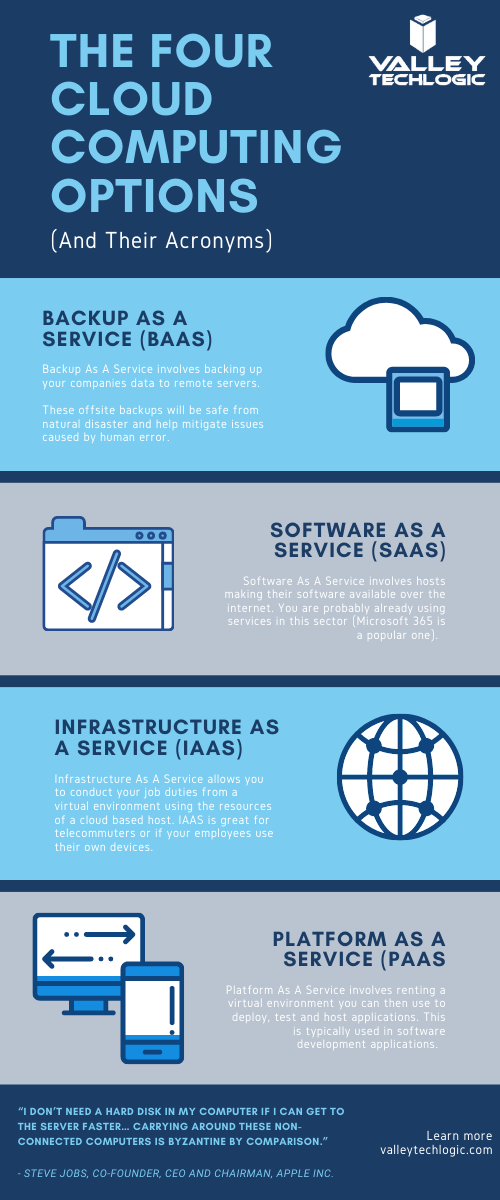
    Chart With Cloud Acronyms

    Backup solutions, including those in the cloud, can be a complex undertaking. You want to make sure It’s done correctly so if the time should come that you actually need to utilize that backup it goes as smooth as possible and doesn’t leave your business down for an extended period of time.

    At Valley Techlogic we are experts in the field of crafting backup solutions tailored to the businesses we service. If your business is located in the Central Valley and you need assistance in creating a reliable backup solution for your business, we’re happy to provide a free consultation. You can schedule one here.

    Looking for more to read? We suggest these tech articles from the last week.

    This article was powered by Valley TechLogic, an IT provider in Atwater, CA. You can find more information at https://www.valleytechlogic.com/ or on Facebook at https://www.facebook.com/valleytechlogic/ . Follow us on Twitter at https://x.com/valleytechlogic.


  • Top 10 Tips for Managing Your Social Media Presence

    Top 10 Tips for Managing Your Social Media Presence

    As a technology service provider, we don’t think it’s much of a leap to weigh in on the topic of social media, there are many technical aspects that come with managing your business’s presence on all the various social media platforms. You may be asking yourself if it’s worth the effort or which ones would be the best fit for your business – or even how to go about setting them up in the first place.

    We have to be honest that we’re somewhat “green” to this space ourselves, having only dived into it within the last year in earnest. However, I think this gives us a unique perspective as we’re not claiming to be experts. We use and have grown within the social media space this year and these are our tips for getting started.

    1. Claim Your Business. Whether you plan to move forward with a platform or not, we recommend claiming your business identity on as many of the networks as you can, by doing this you can ensure your business name is not taken by someone else later on.
    2. Start And/Or Finish Filling Out Google My Business. While not a social media account per se, Google My Business is a crucial advertising tool that allows visitors to reach not only your website but also all of your social media accounts through a Google search. It is important to maintain this account with valid information.
    3. Fully Fill Out Your Profile Pages. As with Google My Business, it’s important to fully establish the profile before jumping into posting content. The more information about your business you can provide the better.
    4. Decide Which Platforms to Focus Your Efforts. Not every platform is a good fit for every business, you need to go to where your customers are. We recommend LinkedIn and Facebook as good places to start but depending on your business sector platforms such as Instagram or Twitter may net you a good response as well. Even TikTok may be worth the effort for your business depending on your overall audience.
    5. Post Regularly. You should set a schedule and stick to it when it comes to sharing content on social media, these platforms reward regular activity by focusing more eyes (and potential customers) at business’s who utilize their platforms consistently.
    6. Share Things About Your Business. Customers like to get an “inside look” into the inner workings of the business’s they’re thinking about engaging with, especially in the business-to-business sector. Share things like company events and photos to engage with your audience on a personal level.
    7. Share Custom Content. Another idea for content is to share things you make or blogs you post. Both Google and the social media platforms reward custom made content.
    8. Invite People You Know to Like Your Page. When first starting out it’s a good idea to invite customers and colleagues to like your social media pages, this allows them to receive the updates you post and helps you begin building an audience.
    9. Consider Paid Activity. We don’t suggest trying this off the bat but once your page is somewhat established, you might consider paid ads through these platforms to drive the content you’re creating and sharing to an even wider audience.
    10. Engage With Your Audience. Our final tip is just to remind you to always engage with your audience, responding to comments not only lets you form a connection with potential clients but it also shows that your business is proactive and responsive.

    We also found this article on Facebook statistics really helpful when it comes to evaluating Facebook in particular. Facebook falls just behind YouTube and Google on having the most web traffic, but that’s still hundreds of millions of users.

    One bonus tip, many of us don’t consider YouTube to be a social media application, but it really is. Not only can you connect with your audience on a personal level through video, it’s also connected to Google as they own it. Building up a business YouTube account can also lead to more traffic from Google.

    We hope these tips help with getting started in social media, while outside our normal scope if your business would like advice on this topic or on any of regular service topics feel free to reach out.

    Looking for more to read? We suggest these tech articles from the last week.

    This article was powered by Valley TechLogic, an IT provider in Atwater, CA. You can find more information at https://www.valleytechlogic.com/ or on Facebook at https://www.facebook.com/valleytechlogic/ . Follow us on Twitter at https://x.com/valleytechlogic.